 English
  日本語
日本語  Deutsch


Preparing a 3D model for printing is not just about making sure it looks correct on screen. It is also about making sure the file can be processed smoothly, quoted accurately, and produced without avoidable delays. One of the most common mistakes customers make is uploading multiple parts in a single file, especially when working with miniature models, assemblies, or small detailed components.
At first glance, combining several parts into one file may seem efficient. In reality, it can create problems in file reading, pricing, production handling, and shipping calculation. In many cases, keeping one part per file is the safest and most reliable way to prepare a model for 3D printing.
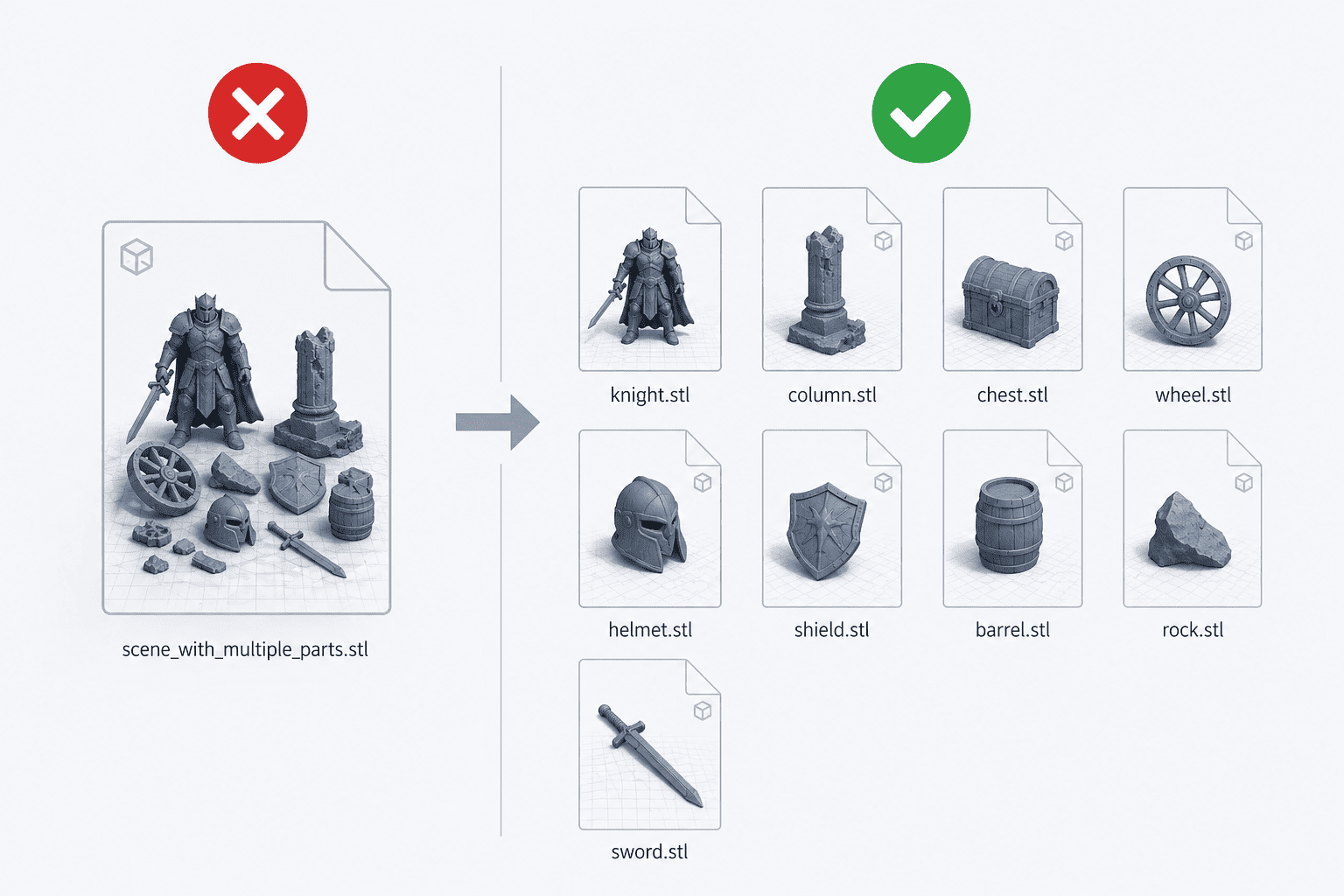
AI Generated Image
What “One Part per File” Means
“One part per file” means that each printable object should be saved as its own separate file instead of being grouped together with other parts in one model file. For example, if a project contains a base, a character figure, and several accessories, each item should ideally be exported individually.
“One part per file” makes it easier for the production team to identify, inspect, and process each part. It also helps reduce confusion when the file is uploaded into a quotation or production system. In a professional 3D printing workflow, a clean file structure is often just as important as the model design itself.
3D printing services usually need to evaluate each part separately. They may need to check dimensions, wall thickness, bounding box size, material usage, support requirements, and placement on the build platform. When multiple parts are mixed into one file, that process becomes much harder.
Common Problems Caused by Multiple Parts in One File
Putting multiple parts into one file can cause several issues during production. Some of these problems are technical, while others affect cost and workflow.
One common issue is file parsing errors. When a file contains multiple disconnected shells or objects, the software may not interpret them correctly, which can lead to inaccurate volume readings, failed analysis, or model detection problems. In some cases, the system may treat separate objects as a single combined shape, which can distort the quotation or print preparation.
Another problem is the risk of missing or losing small parts. This is especially important for tiny components such as miniature accessories, mechanical details, or decorative elements. Small pieces can be overlooked during file review or production handling. When parts are separated clearly, they are easier to track and manage.
Multiple parts in one file can also lead to incorrect shipping calculations. A system may calculate the model’s overall dimensions based on the combined file instead of each individual part. This can affect packing size, shipping weight estimates, and final freight costs. In some cases, the initial quote may be wrong, and the order may need to be adjusted later.
There is also the issue of production noncompliance. Some service providers require a separate file for each part because it simplifies review and manufacturing. If a file does not meet those requirements, the order may be delayed until the customer resubmits the files or pays an additional processing fee. That creates unnecessary back-and-forth and slows down the entire project.
In short, a multi-part file may seem convenient to upload, but it often creates more work later.
Why This Matters More for Miniature and Detailed Models
This issue becomes even more important for miniature models and highly detailed parts. These designs often include many tiny components, thin structures, or delicate features. Because of their size, they are more sensitive to handling errors and file interpretation issues.
Miniature models also tend to be built from multiple separate elements, such as figures, weapons, bases, armor pieces, or scenery details. When all of these are placed in one file, it becomes harder to inspect each item properly. A tiny part may be hidden inside another object, connected by accident, or positioned in a way that causes confusion during slicing or printing preparation.
Detailed models may also require special attention to orientation and support placement. If parts are separated, each one can be reviewed more carefully and optimized for printing. That helps improve print quality and reduces the chance of failure.
For customers working on collectibles, prototypes, figurines, or game-related miniatures, the margin for error is often very small. Even a minor file issue can lead to problems such as broken details, missed parts, or incomplete production. Keeping parts separate gives the printing team a cleaner starting point and improves the chances of a successful result.
Benefits of Keeping Parts Separate
The biggest advantage of separating parts into individual files is clarity. A clean file structure allows the production team to understand exactly what needs to be printed and how each item should be treated.
It also makes file review easier. Technicians can check each part on its own, which speeds up the inspection process and reduces the chance of overlooking errors. When a model is organized properly, there is less need for manual correction or follow-up communication.
Another benefit is better print reliability. Separate parts are less likely to be misread by software or grouped incorrectly in the processing stage. That means fewer surprises during slicing, fewer quoting mistakes, and fewer chances that the print will need to be redone.
Keeping parts separate also improves workflow efficiency. Production teams can sort, batch, and manage jobs more easily when each file contains only one object. This is especially useful in high-volume environments where many orders are being processed at once.
Accurate pricing is another important benefit. A single-part file makes it easier to calculate volume, material use, and shipping needs. That leads to more reliable quotations and fewer corrections after the order has been placed.
For the customer, all of this adds up to a smoother experience. The files are easier to prepare, the quote is easier to understand, and the production process is less likely to be delayed.
Best Practices Before Uploading Files
Before uploading files for 3D printing, it is a good idea to check a few key things.
First, make sure each part is exported separately whenever possible. If a project includes several pieces, save them as individual files so they can be reviewed on their own. This helps prevent confusion and makes the upload process more organized.
Second, inspect the model for hidden shells, disconnected geometry, or accidentally merged objects. Sometimes a file looks like one object on screen but actually contains multiple bodies or surfaces. A quick check before uploading can save a lot of time later.
Third, use clear file names. Naming each file according to its part helps the production team identify it quickly. For example, names like “base,” “figure,” or “left_arm” are much easier to understand than generic filenames.
Fourth, confirm that each part is scaled correctly. A file may be technically complete but still produce problems if the dimensions are wrong. Checking the scale before upload helps avoid expensive reprints and delays.
Finally, review the provider’s file requirements. Some services accept assemblies in special cases, while others require every part to be separated. Reading the guidelines before submission is one of the easiest ways to prevent rejection or extra fees.
When Multiple Parts Might Be Acceptable
There are some cases where multiple parts in one file may be acceptable, but this depends on the service provider and the purpose of the model.
For example, some customers may upload an assembly to show how parts fit together, while still needing each piece produced separately. In that situation, the combined file may be useful for reference, but it should not replace individual part files if the provider requires separation.
Multiple parts may also be acceptable when the pieces are intentionally connected and meant to be printed as one object. In that case, the model is no longer treated as separate components, but as a single printable structure. Even then, it is still important to make sure the geometry is clean and the file meets production standards.
The key point is that special cases should be confirmed in advance. Do not assume that a multi-part file will be accepted just because it opens correctly on your computer. A file can look fine in modeling software and still cause issues in the production system.
When in doubt, separate the parts. It is usually the safest choice and the easiest way to avoid unnecessary delays.
 0
0


COMMENTS
- Be the first to share your thoughts!