 English
  日本語
日本語  Deutsch


One of the biggest advantages of 3D printing is its ability to produce complex geometries that are difficult or impossible with traditional manufacturing methods. However, "complex" does not mean "unlimited." Every 3D printing technology has physical limitations, and certain design features can significantly increase manufacturing difficulty, reduce print quality, or lead to failed builds.
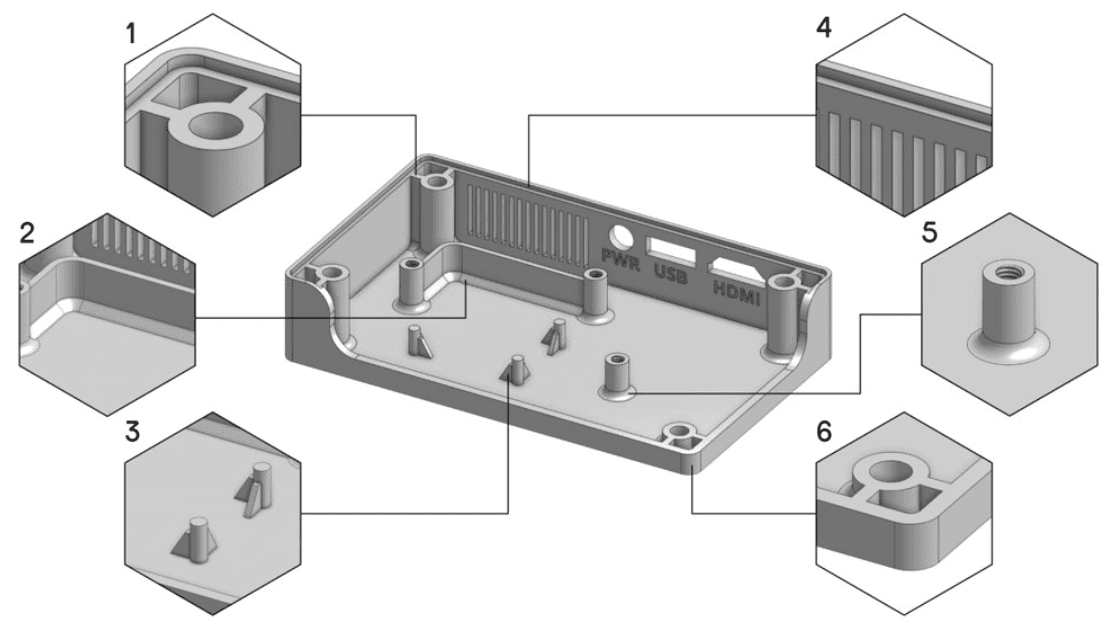
Image Source: UltiMaker
Extremely Thin Walls
Thin walls are among the most common causes of failed or damaged prints. If a wall is thinner than the minimum printable thickness for the selected process, it may warp, crack, or fail to form completely.
Wall thickness requirements vary by technology and material. Resin printing can often produce finer features than nylon powder bed fusion, while metal printing generally requires thicker walls to maintain structural integrity during the build.
When possible, maintain consistent wall thickness throughout the model. Sudden transitions between thick and thin sections can also introduce internal stress and reduce dimensional accuracy.
Large Unsupported Overhangs
Although 3D printing builds parts layer by layer, every layer still needs adequate support. Large overhangs can sag, deform, or produce rough surfaces if they are printed without sufficient support structures.
Support material increases both material consumption and post-processing time. After removal, supported surfaces may also require sanding or additional finishing.
Designers can reduce these issues by changing the part orientation, splitting the model into multiple components, or incorporating self-supporting angles wherever possible.
Deep and Narrow Cavities
Internal cavities are useful for reducing weight or creating functional channels, but very deep and narrow cavities often become difficult to manufacture.
In resin printing, uncured resin may remain trapped inside the cavity. In powder-based processes such as SLS or metal printing, excess powder can be difficult to remove completely. Narrow openings also make inspection and cleaning much harder.
Whenever possible, design cavities that are accessible or include openings that allow cleaning after printing.
Tiny Holes and Narrow Channels
Small holes rarely print at their exact CAD dimensions. Depending on the process, tiny holes may shrink, become partially blocked, or close entirely during printing.
Similarly, narrow fluid channels may become obstructed by residual material or powder, reducing their intended functionality.
If precise hole dimensions are critical, it is often better to print a slightly undersized hole and finish it with drilling, reaming, or other machining operations after printing.
Sharp Corners and Thin Edges
Perfectly sharp edges may look attractive in CAD, but they are rarely ideal for manufacturing.
Thin edges are more susceptible to chipping, distortion, and accidental damage during support removal or handling. Sharp internal corners can also concentrate stress, especially in functional components subjected to repeated loading.
Replacing sharp corners with small fillets or chamfers not only improves durability but also makes printing more reliable across different manufacturing processes.
Large Flat Surfaces
Large flat panels often experience uneven cooling or shrinkage, which can cause warping even when the rest of the part prints successfully.
The effect is particularly noticeable in large plastic components but can also occur in metal additive manufacturing due to thermal stress.
Instead of designing large unsupported flat areas, consider adding ribs, gentle curves, or reinforcing structures to increase stiffness without significantly increasing weight.
Enclosed Hollow Structures Without Escape Openings
Hollow designs reduce weight and material usage, but completely enclosed cavities create manufacturing challenges.
In powder bed fusion, trapped powder cannot be removed after printing if no escape holes are provided. In resin printing, uncured resin may remain inside sealed chambers, affecting both weight and long-term performance.
Properly sized escape holes allow excess material to be removed while maintaining the intended appearance of the finished part. Their size and placement should be considered during the initial design rather than added later.
Very Fine Embossed or Engraved Details
Logos, serial numbers, and decorative textures are commonly added to 3D printed parts. However, details that are too small may become unreadable after printing or disappear during post-processing.
Both embossed and engraved features require sufficient depth and width to remain visible. Surface finishing processes such as bead blasting, polishing, or painting can further reduce fine detail.
Using larger text, thicker lines, and adequate feature depth improves the likelihood that these markings remain clear on the final part.
Integrated Moving Assemblies with Tight Clearances
Print-in-place mechanisms are one of the most exciting applications of additive manufacturing. Hinges, joints, and articulated components can often be printed as complete assemblies without requiring additional assembly.
However, clearances that are too tight may cause adjacent components to fuse together during printing. The required spacing depends on the printing technology, material, and expected movement.
Testing design clearances with prototypes before full production is often the most reliable way to ensure moving components function as intended.
Large Solid Sections
Large solid blocks consume more material, increase printing time, and often generate greater internal stress during manufacturing.
In addition to higher production costs, thick solid sections may cool unevenly, leading to distortion or dimensional variation.
When strength requirements permit, replacing solid interiors with hollow structures or lattice infill can significantly reduce weight, shorten production time, and improve overall manufacturing efficiency.
Successful 3D printing begins with thoughtful design. While 3D printing provides remarkable geometric freedom, certain features remain more difficult to produce consistently than others. Extremely thin walls, unsupported overhangs, inaccessible cavities, tiny holes, sharp edges, large flat surfaces, enclosed hollows, fine surface details, tight moving assemblies, and oversized solid sections can all increase manufacturing complexity.
 0
0


COMMENTS
- Be the first to share your thoughts!