 English
  日本語
日本語  Deutsch


Transparent parts are attractive and functional as they let light pass, show internal structure, and give prototypes a glass-like appearance. PMMA (polymethyl methacrylate, commonly called acrylic or “plexiglass”) is one of the best FDM options for semi-transparent prints. It is more optically clear than many commodity filaments and responds well to wet-sanding and solvent polishing.
What is PMMA?
PMMA (polymethyl methacrylate) is a thermoplastic often sold under trade names such as Plexiglas®, Acrylite®, and Perspex®. It’s an amorphous polymer (not strongly crystalline), which helps it achieve very good optical transmission in molded parts. In filament form, PMMA is formulated for extrusion and may include additives to improve toughness, UV stability, or printability. Like other high-temperature filaments, PMMA needs higher nozzle/bed temperatures and benefits from a controlled printing environment to reduce warping and bubbles.
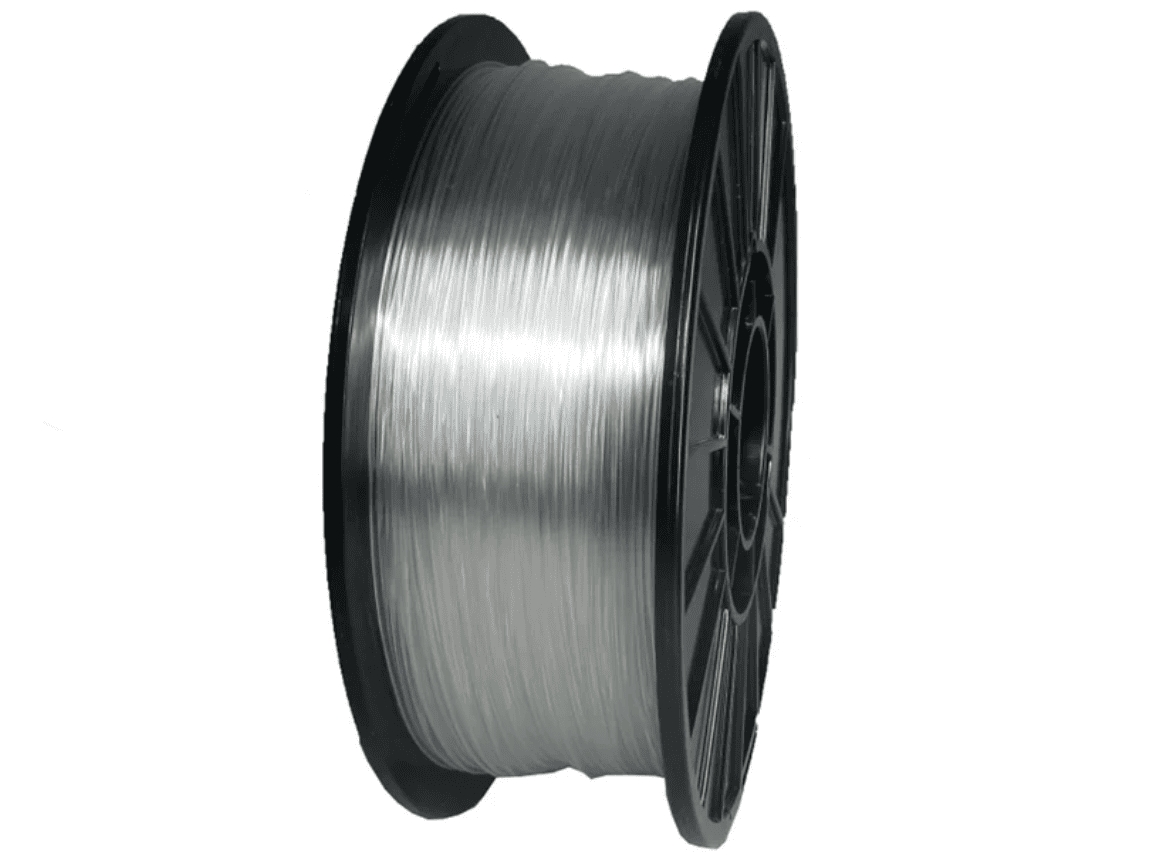
Image Source: Push Plastic
Optical and Physical Properties
Optical Properties
PMMA has excellent light transmission as a bulk material (injection-molded acrylic can transmit ~90% of visible light). FDM parts rarely match molded clarity because of layer boundaries and micro-voids, but PMMA filament prints are among the clearest FDM results once properly tuned and post-processed.
Mechanical and Thermal
PMMA is relatively stiff and has good dimensional stability for many prototype parts. Compared with polycarbonate, it’s less impact-resistant but is generally less prone to yellowing and has better scratch resistance than some softer clear filaments. PMMA’s heat deflection and service temperatures are lower than those of engineering polymers like PC, so it’s not ideal where continuous high heat or severe impact resistance are needed.
Chemical Behavior
PMMA is soluble in certain organic solvents (e.g., some chlorinated solvents, aromatic solvents and esters) and can be smoothed by compatible solvents. This chemical solubility is useful for achieving glossy finishes but demands careful safety practices (ventilation, PPE).
Printing Temperatures (Typical Ranges)
Typical validated nozzle ranges for PMMA filaments are around 220–260 °C, with many manufacturers recommending ~240–255 °C for stable extrusion and clarity. Heated bed temperatures are commonly ~80–110 °C, and an enclosure is recommended to reduce warping. Always use the filament maker’s datasheet as the final authority because formulations vary.
How to Get the Clearest FDM Prints
1. Design and Slicing Tips
Use simple wall geometries (single or few walls for light-pipes) and avoid unnecessary infill when transparency is the goal; solid thin walls transmit light better than thick, porous infill. If structural strength and clarity are both needed, print with thicker walls and high infill, but be prepared to post-process. Orient the part so the critical optical surface is printed with minimal seams; for cylindrical light-pipes, print with the axis vertical to avoid concentric layer seams on the optical surface.
2. Nozzle, Layer Height and Speed
Use a moderate layer height. Very thin layers reduce visible stair-stepping but increase the number of layer boundaries; moderately large layers (with a well-tuned extrusion multiplier) often give better clarity after polishing. A larger nozzle (0.6–1.0 mm) with carefully tuned flow can reduce internal voids and produce “bulkier” bead deposition that sands and polishes better. Increase nozzle temperature slightly within vendor recommendations to improve interlayer fusion.
3. Thermal Control and Adhesion
Use a stable, heated bed and an enclosure. Thermal gradients cause warping and internal stress, which scatter light; maintaining a warm chamber reduces this. Adhesives help with first-layer adhesion to avoid lifting.
4. Minimize Cooling
Reduce or eliminate part cooling fans. Forced cooling increases rapid solidification and can amplify interlayer interfaces; warmer layers give better bonding and less scattering.
5. Post-processing for Optical Clarity
• Wet sanding: move from coarse to fine grits (e.g., 220 → 400 → 800 → 1500 → 3000), keeping the surface wet to avoid heat damage. Progressively finer grits remove layer lines and prepare the surface for polishing.
• Polishing compounds: rotary polishing with plastic polish compounds or buffing wheels can restore gloss.
• Solvent smoothing / vapor polishing: PMMA is amenable to solvent smoothing methods that dissolve the outermost layer and fuse it into a glassy finish. Use proper, material-specific solvents and controlled setups.
6. Coatings
Clear epoxy, spray lacquer or polyurethane coatings can fill micro-voids and create a durable, glass-like finish. Epoxy adds thickness and can affect fit, so plan accordingly.
Pros and Cons
|
Pros |
Cons |
|
Among FDM filaments, PMMA yields some of the clearest raw prints and responds well to sanding, polishing and solvent smoothing. |
Warps easily if printed without an enclosure and proper bed adhesion. |
|
Good UV and weather resistance compared with some clear alternatives, making it suitable for display parts and some outdoor exposures. |
Requires higher temperatures and careful tuning; not as easy as PETG or PLA for novice users. |
|
Accepts mechanical and chemical finishing that can approach injection-molded clarity for many applications. |
Solvent smoothing uses hazardous chemicals and demands good ventilation and PPE. Epoxy coatings add weight and thickness which may not be acceptable for tight-tolerance parts. |
Applications
PMMA filament is used where appearance and light transmission matter more than extreme mechanical toughness:
• Light Pipes and indicators: internally transmitting parts that guide LEDs and diffuse light.
• Prototype windows and covers: aesthetic prototypes, displays and model glazing.
• Architectural models and museum replicas: where clarity and scratch resistance are valued.
• Display and signage prototypes: illuminated signs and lenses for mockups.
• Educational and scientific models: where internal detail should remain visible.
PMMA vs Other Transparent Material Options
PMMA vs PETG
PETG is easier to print, more impact resistant and forgiving; it can be made semi-clear but usually scratches more easily and doesn’t polish to the same glass-like finish as PMMA. Choose PETG for quick, durable prototypes; choose PMMA when optical clarity is a priority.
PMMA vs Polycarbonate (PC)
PC is tougher and has higher heat resistance, but transparent grades of PC are harder to print and often less optically clear than PMMA without heavy post-processing. For optically critical parts that won’t see heavy mechanical abuse, PMMA is often the better FDM choice.
PMMA (FDM) vs Resin SLA/DLP
SLA resins (clear resins) usually produce the clearest optical parts straight off the printer and can outperform PMMA for fine optics. However, SLA parts can yellow over time (depending on resin) and may lack PMMA’s scratch resistance. If you need small, near-perfect optics, consider SLA; if you need larger, tougher transparent parts that accept sanding and coatings, PMMA is a good option.
 0
0


COMMENTS
- Be the first to share your thoughts!